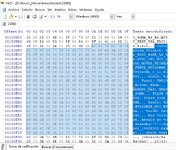
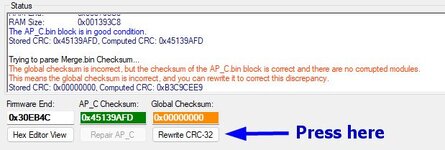
Por algún motivo desconocido o manipulación manual del CRC, es que está en 0x00000000Después de modificar el código
Stored CRC: 0x D751F321, Computed CRC: 0x D751F321
Se corrige fácilmente...
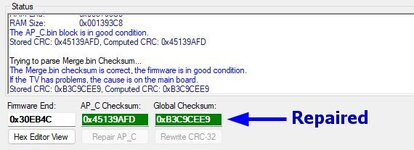
Después de recargar el archivo...

Follow along with the video below to see how to install our site as a web app on your home screen.
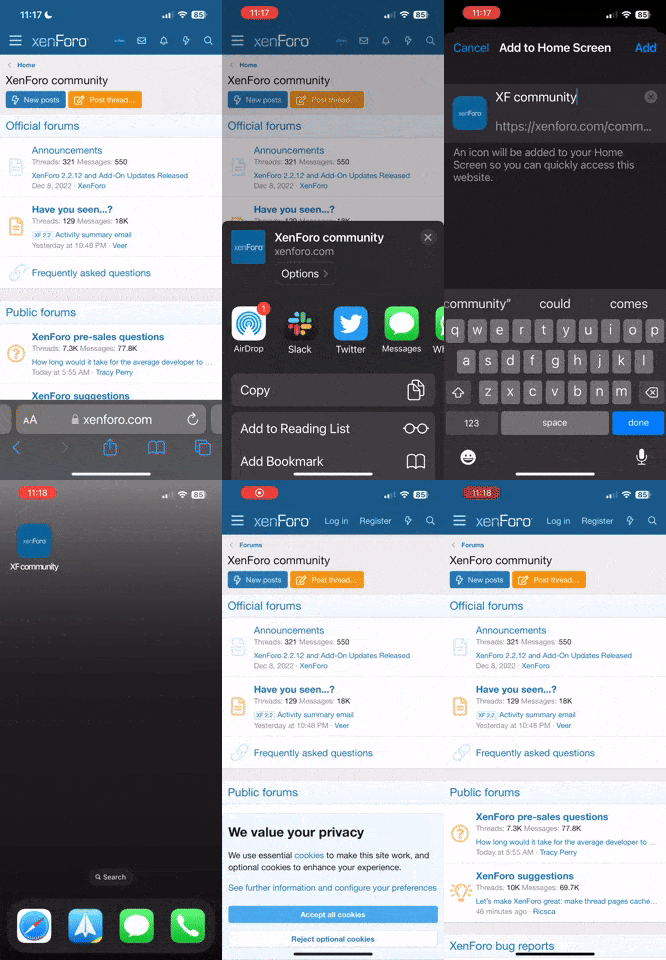
Nota: This feature currently requires accessing the site using the built-in Safari browser.
Por algún motivo desconocido o manipulación manual del CRC, es que está en 0x00000000Después de modificar el código
Stored CRC: 0x D751F321, Computed CRC: 0x D751F321
Para evitar la manipulación manual, puedes modificar el código de la siguiente manera.Attach the dump file so we can analyze why it's in that state.
try
{
    byte[] fileBytes = File.ReadAllBytes(dumpFile);

    long currentEndFirmware = endFirmware;
    int maxIndex = fileBytes.Length - 4;
    bool foundFF = false;

    for (long i = endFirmware; i <= maxIndex; i++)
    {
        bool allFF = true;
        for (int j = 0; j < 4; j++)
        {
            if (fileBytes[i + j] != 0xFF)
            {
                allFF = false;
                break;
            }
        }
        if (allFF)
        {
            actualEndFirmware = i - 4;
            foundFF = true;
            break;
        }
    }

    if (!foundFF)
    {
        currentEndFirmware = fileBytes.Length - 4;
    }

    byte[] dataToCheck = new byte[currentEndFirmware];

    Array.Copy(fileBytes, 0, dataToCheck, 0, dataToCheck.Length);

    byte[] storedCrcBytes = new byte[4];
    Array.Copy(fileBytes, currentEndFirmware, storedCrcBytes, 0, 4);
    Array.Reverse(storedCrcBytes);

    uint storedCrc = BitConverter.ToUInt32(storedCrcBytes, 0);
uint computedCrc = CRCUtility.CRC32.Compute(dataToCheck, 0, dataToCheck.Length);La manipulación manual no se puede evitar y tampoco por alteraciones en la placa.Para evitar la manipulación manual, puedes modificar el código de la siguiente manera.
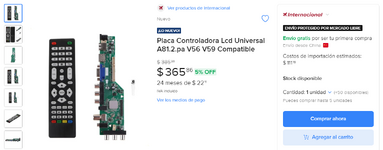
Hay un vendedor internacional desde China en Mercado Libre (en ALIEXPRESS hay bastantes) que vende una placa modelo v56 v59 que cambia de resolución via USB teniendo el BIN (firmware) correspondiente a la resolución deseada, aquí estan las Resoluciones compatibles:No creo que en el firmware venga algún archivo de configuración de panel para 1024x600
Tal vez desde el menú de servicio o por consola, pero no del volcado, y ya fue explicado el motivo.¿Sería posible extraer la resolución del archivo .bin de nuestro interés y adaptarla al archivo .bin de nuestra tarjeta principal?
Puedes reexplicar el motivo?Tal vez desde el menú de servicio o por consola, pero no del volcado, y ya fue explicado el motivo.
El display no se puede modificar porque la matriz ya viene fabricada con esa resolución.Entonces sería cuestión de modificar el Display de 10.1 para que se comporte como si tuviera la resolución que tiene la tarjeta principal. ¿Será posible?
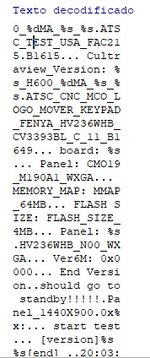
Usando BINWALK en el volcado SPI puedo ver que la placa puede manejar 2 paneles diferentes: el que trae de fábrica HV236WHB (1366X768) y el otro CMO M190A1 (1440X900) . ¿Se puede seleccionar el tipo de panel en el Menú de Servicio o por Consola ?No creo que en el firmware venga algún archivo de configuración de panel para 1024x600
No es necesario usar binwalk porque desde la aplicación puedes extraer las cadenas.usando BINWALK en el volcado SPI puedo ver que la placa puede manejar 2 paneles diferentes: el que trae de fabrica HV236WHB (1366X768) y el otro CMO M190A1 (1440X900)
Inténtalo y nos comentas, ya que tú tienes el televisor y no todos los sistemas son iguales.¿Se puede seleccionar el tipo de panel en el Menú de Servicio o por Consola?
Buenas tardes Moderador hace unos dias encontré un sitio: Ремонт телевизоров в Николаеве ruso en donde pregunte sobre el tema de edición del mando a distancia, el administrador me pregunto sobre el tipo de chasis relacionado a ese firmware TP.VST59S.PB817-BPL, pero en unas de mi preguntas tuve la fatalidad de pegar texto en español, desde entonces e intentado registrar, sin éxito, al parecer ellos tienen algún mecanismo, que me lo impide no se si usted o alguien del foro puede registrar y ayudarnos con información relacionada al tema.Se supone que el tipo de panel se debe poder asignar por consola.
No sé si han visto que dentro del módulo AP descomprimido hay un gato en ASCII que es el logotipo del sistema CatEye.
Este sistema cuenta con un menú de opciones al que se accede por comandos.
Muestra algo cómo: "Welcome to MStar Menu Mode System 1.0"
Abajo muestra lo siguiente...
-Press 'dbg' enter debug main page
-Press 'cat' enter cateye main page
-Press 'unt' enter unit test main page
-Press 'cfg' enter set config main page
-Press <ESC> exit uart debug system
Para poder entrar a este menú se debe tener habilitado el UART desde el menú de servicio.
Ya habilitado y después de que termine el log de inicio, se envía el comando de acceso <ENTER>.
En config main page (cfg) es donde se puede establecer el tipo de panel LCD
Mostrará algo cómo...
-Press '000' Change panel type to SXGA(1280x1024), Pnl XXXX
-Press '001' Change panel type to WXGA(1366x768), Pnl XXXX
Y así con el resto de paneles.
-Press <FF> return to pre-page
-Press <ESC> exit uart debug system
Hay más menús y van siendo mostrados de la misma forma.
Al taller ya no entran este tipo de televisores y vendí todas las placas, así que ya no puedo realizar pruebas.
Si lo logran, comenten sus experiencias por aquí.
No les recomiendo entrar a esa comunidad, el administrador es sumamente desagradable y racista.en unas de mi preguntas tuve la fatalidad de pegar texto en español, desde entonces e intentado registrar, sin éxito, al parecer ellos tienen algún mecanismo, que me lo impide no se si usted o alguien del foro puede registrar y ayudarnos con información relacionada al tema.
Hice pruebas con una placa TP.MS3393.PB851 que tiene un SoC MSD3393LU, entré al menú de servicio y dejando habilitada la opción UART y hasta una opción que permite mostrar el log de toda la actividad que va ocurriendo en tiempo real en la placa, y ni aún así pude desde la consola acceder a las opciones antes descritas, el sistema no entra en modo depuración por lo que no pude enviar comandos para acceder al menú "especial" para poder seleccionar algún panel LCD de los que están en el módulo AP descomprimido usando la opción "Strings" .Se supone que el tipo de panel se debe poder asignar por consola.
No sé si han visto que dentro del módulo AP descomprimido hay un gato en ASCII que es el logotipo del sistema CatEye.
Este sistema cuenta con un menú de opciones al que se accede por comandos.
Muestra algo cómo: "Welcome to MStar Menu Mode System 1.0"
Abajo muestra lo siguiente...
-Press 'dbg' enter debug main page
-Press 'cat' enter cateye main page
-Press 'unt' enter unit test main page
-Press 'cfg' enter set config main page
-Press <ESC> exit uart debug system
Para poder entrar a este menú se debe tener habilitado el UART desde el menú de servicio.
Ya habilitado y después de que termine el log de inicio, se envía el comando de acceso <ENTER>.
En config main page (cfg) es donde se puede establecer el tipo de panel LCD
Mostrará algo cómo...
-Press '000' Change panel type to SXGA(1280x1024), Pnl XXXX
-Press '001' Change panel type to WXGA(1366x768), Pnl XXXX
Y así con el resto de paneles.
-Press <FF> return to pre-page
-Press <ESC> exit uart debug system
Hay más menús y van siendo mostrados de la misma forma.
Al taller ya no entran este tipo de televisores y vendí todas las placas, así que ya no puedo realizar pruebas.
Si lo logran, comenten sus experiencias por aquí.
Sería bueno si pudieras explicar un poco más al detalle esto pues en el archivo en formato de texto no encuentro nada al respecto.No sé si han visto que dentro del módulo AP descomprimido hay un gato en ASCII que es el logotipo del sistema CatEye